
About the abnormal pen pressure
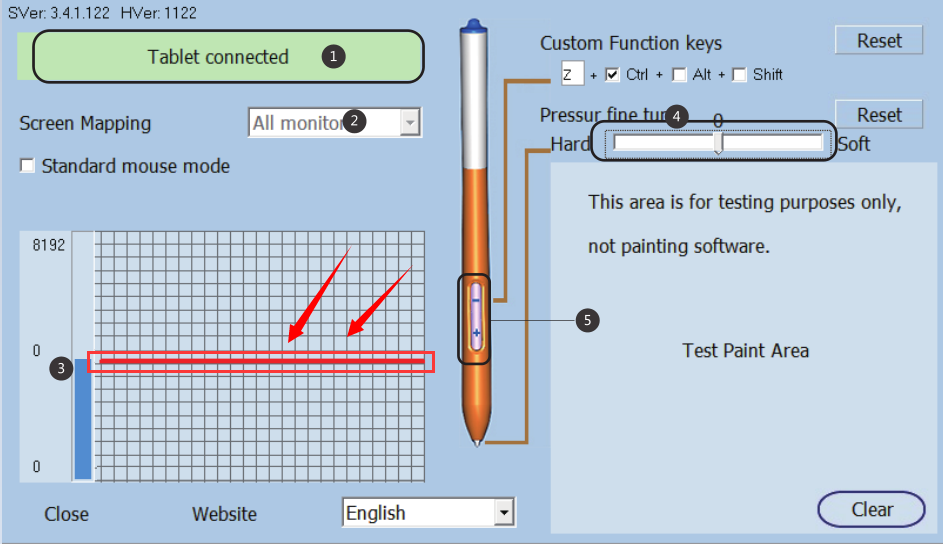
In pen setting interface,the pen does not touch theGraph Tablet,but the pressure curve becomes a straight line and the level of pressure above zero. This indicates that the pressure of the pen may be abnormal.
Solution:
Please use the nib removal tool to remove the nib,replace the pen nib as follows:
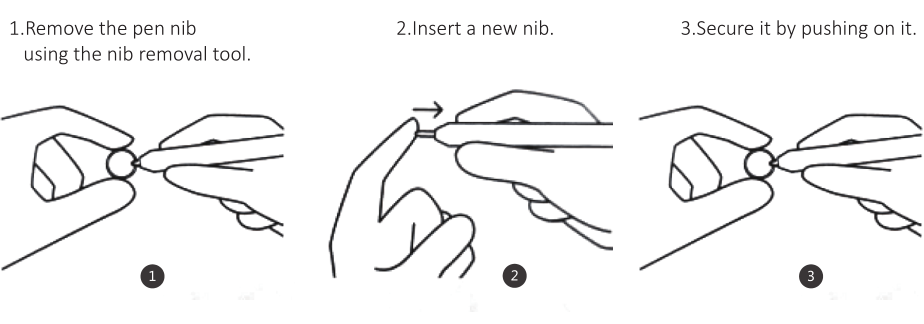
If the problem remains the same, please remove the nib once again, tap the pen on the desk several times, and then insert the nib once again,then use the pen drawing at tablet.
At this moment,please observe the pressure curve:
1.
If the pressure curve becomes a straight line and at 0 position,that means the pressure of pen is working properly.
2.
If the pressure curve is falling, but not at 0 position,try it several more times according to the above method,let the pressure curve drop to zero. Pressure curve line in the location of the 0,the Pen pressure can only be work normally.